

From Zero to Agentic AI: My Journey with the Jetson Orin Nano Super Developer Kit
The Quest for True AI Autonomy
As a software engineer, I was fascinated by the AI revolution but wanted to get hands-on experience with local LLMs and building AI agents. I was tired of relying on cloud APIs and dreamed of creating AI that could run locally and make autonomous decisions.
The problem? My trusty 2019 MacBook Pro simply couldn't handle the computational demands of running modern AI models locally. Even simple 7B parameter models would either crash or run so slowly that experimentation became frustrating.
That's when I discovered the NVIDIA Jetson Orin Nano Developer Kit - a $249 device specifically designed for running AI models at the edge. It was the perfect fit for my goals: affordable, powerful enough for serious AI development, and purpose-built for exactly what I wanted to learn.
This is the story of how I built an AI agent that can see through cameras, think with local LLMs, make decisions through N8N workflows, and communicate via Telegram - all running on a device that fits in your palm and costs less than a high-end GPU.
Meet the Jetson Orin Nano: A Tiny Beast
Why This Little Green Board Changed Everything
The NVIDIA Jetson Orin Nano Super Developer Kit looks unassuming - about the size of a credit card, green PCB, some ports scattered around the edges. But don't let its humble appearance fool you. This $249 device packs the computing power that would have cost tens of thousands just a few years ago:
- 6-core ARM Cortex-A78AE v8.2 64-bit CPU with 1.5MB L2 + 4MB L3 cache
- NVIDIA Ampere GPU with 1024 CUDA cores and 32 tensor cores
- 67 INT8 TOPS AI performance (up from 40 TOPS with the "Super" software boost)
- 8GB 128-bit LPDDR5 memory with 102 GB/s bandwidth
- Power consumption: 7W–25W (incredibly efficient)
- Storage: SD card slot and external NVMe support
- Ubuntu 22.04.5 LTS - a familiar Linux environment
ISSUE 1: You need to flash your device
The Flashing Journey: microSD + Balena Etcher
Here's something NVIDIA doesn't make immediately obvious: the Jetson Orin Nano Super Developer Kit doesn't come pre-flashed with an operating system. You need to flash it yourself first! I learned this the hard way when I eagerly unboxed my kit, expecting to plug it in and start coding immediately.
Fortunately, I had a stroke of luck - my DJI Mavic Mini drone had a 64GB microSD card that I wasn't actively using, and this turned out to be exactly the minimum size required for flashing the Jetson OS. If you're planning to get a Jetson, keep this in mind: you'll need at least a 64GB microSD card to get started.
The flashing process with Balena Etcher was straightforward once I had the right hardware, but this initial requirement caught me off guard. While this gets you up and running quickly, I soon realized that for serious AI development, I needed more storage space and better performance.
ISSUE 2: More space, I said I need more space!
The NVMe SSD Upgrade
After running out of space on the microSD setup, I added a 1TB NVMe SSD for my AI development work:
# The moment of truth - checking available space after NVMe SSD upgrade
df -h
# /dev/nvme0n1p1  916G   28G  841G   4% /mnt/bigdata
# From microSD limitations to nearly 1TB - now we're talking!
Why the Storage Extension is Non-Negotiable:
- Model Storage: Modern LLMs (7B-13B parameters) need 4-8GB each, and you want options
- Docker Images: Ollama, N8N, and development tools consume several GB
- Development Space: Source code, datasets, logs, experiments, and model fine-tuning
- Performance: NVMe SSD is significantly faster than microSD for model loading
- Future-Proofing: Room to grow as you add more AI capabilities and larger models
Critical Configuration Details:
Make sure you configure Docker, Ollama, and other services to use the right partition. I learned this the hard way when my models kept filling up the system partition instead of my spacious NVMe drive:
# Configure Docker to use the NVMe partition
sudo systemctl stop docker
sudo mv /var/lib/docker /mnt/bigdata/docker
sudo ln -s /mnt/bigdata/docker /var/lib/docker

# Move Ollama models to NVMe
export OLLAMA_MODELS=/mnt/bigdata/ollama-models
You'll also need to set up log cleanup automation, or your system will eventually fill up with Docker logs, N8N logs, and AI service logs. Trust me, logs accumulate faster than you think:
# Configure Docker log rotation
echo '{"log-driver": "json-file", "log-opts": {"max-size": "10m", "max-file": "3"}}' | sudo tee /etc/docker/daemon.json

# Set up automatic cleanup
sudo crontab -e
# Add: 0 2 * * * docker system prune -f
While you can start with the microSD card approach using Balena Etcher (which is perfect for getting familiar with the device), adding an NVMe SSD becomes essential for serious AI development. The external NVMe support makes this upgrade straightforward.
My First Workflow: Internet Research Agent
Building My First Local AI Workflow
Once I had the system stable and AI assistance helping me navigate Linux, I was ready to build something meaningful. I decided to create my first local AI workflow using N8N - a simple but powerful proof of concept that would showcase the potential of agentic AI.
The Goal: Build an internet research agent that could:
- Take a search query as input
- Search the internet for relevant information
- Analyze the top 10 results using my local LLM
- Compose a comprehensive review
- Send the review to me via Telegram bot
This seemed like the perfect first project - it combined web APIs, local AI processing, and automated communication, all orchestrated through N8N's visual workflow builder.
The Workflow Architecture
Here's how my internet research agent works:
N8N Workflow Implementation
The beauty of N8N is that you can build complex AI workflows visually. Here's what my actual research workflow looks like in the N8N interface:
The workflow connects several nodes:
- Telegram Trigger - Listens for incoming messages from my bot
- HTTP Request - Fetches data from search APIs
- IF Logic - Handles different types of requests
- Ollama Model - Local LLM processing for analysis
- File Conversion - Handles different data formats
- Telegram Response - Sends results back to my phone
Here's the simplified code version of my research workflow:
// Node 1: Manual Trigger with search query
{
  "query": "latest developments in edge AI"
}

// Node 2: HTTP Request to search API
const searchResults = await $http.request({
  method: 'GET',
  url: `https://api.search.brave.com/res/v1/web/search?q=${query}&count=10`,
  headers: {
    'X-Subscription-Token': process.env.BRAVE_API_KEY
  }
});

// Node 3: Local LLM Analysis via Ollama
const analysis = await $http.request({
  method: 'POST',
  url: 'http://localhost:11434/api/generate',
  body: {
    model: 'llama2',
    prompt: `Analyze these search results and create a comprehensive review:
             ${JSON.stringify(searchResults.web.results)}

             Please provide:
             1. Key trends and insights
             2. Most important findings
             3. Summary of different perspectives
             4. Actionable takeaways`
  }
});

// Node 4: Telegram Bot Delivery
await $http.request({
  method: 'POST',
  url: `https://api.telegram.org/bot${process.env.TELEGRAM_BOT_TOKEN}/sendMessage`,
  body: {
    chat_id: process.env.TELEGRAM_CHAT_ID,
    text: `🔍 Research Report: ${query}

${analysis.response}`,
    parse_mode: 'Markdown'
  }
});
The Magic Moment
The first time this workflow executed successfully, I was blown away. Within 30 seconds of triggering the search, I received a well-structured, intelligent analysis of the latest edge AI developments directly on my phone. The local LLM had:
- Synthesized information from 10 different sources
- Identified key trends and patterns
- Provided actionable insights
- Delivered it all in a readable format
This wasn't just automation - it was intelligence augmentation running entirely on my $249 device.
What I Learned
This first workflow taught me several important lessons:
- Local AI is powerful: The 7B LLM running on Jetson provided surprisingly good analysis
- N8N is perfect for AI orchestration: Visual workflow building made complex logic manageable
- Edge computing changes everything: No API costs, complete privacy, sub-minute response times
- Agentic behavior emerges: The system felt less like a tool and more like an assistant
This simple research agent became the foundation for more complex workflows involving camera data, motion detection, and automated decision-making.
From Text to Vision: The Next Evolution
After successfully building my internet research agent, I was hooked on the power of local AI workflows. But I wanted more. I wanted my AI agent to truly see and process what it sees. The Jetson's computer vision capabilities were calling to me, and I had a specific vision in mind.
The Idea: A personal surveillance guard that could:
- Monitor the environment through cameras
- Process and understand what it sees using computer vision
- Respond to my requests to "check the area"
- Make intelligent decisions about what's important vs. routine
- Communicate findings back to me with context and visual evidence
This wasn't just about recording video - I wanted an intelligent assistant that could understand scenes, recognize faces, detect unusual activity, and act as my eyes when I'm not around.
Why a Visual AI Agent?
The internet research agent was powerful, but it was still limited to processing text and web data. Adding vision would transform my system from a smart assistant into something approaching true AI autonomy:
- Real-time awareness: Understanding the physical world around it
- Proactive monitoring: Detecting changes and anomalies without being asked
- Contextual intelligence: Distinguishing between normal and noteworthy events
- Visual communication: Showing me what it sees, not just telling me about it
The Technical Challenge
Building a vision-enabled agent meant combining several complex technologies:
- Camera integration: Both USB and CSI cameras working reliably
- Computer vision processing: Real-time image analysis and object detection
- Face recognition: Identifying known vs. unknown individuals
- Motion detection: Distinguishing meaningful movement from noise
- LLM integration: Having the AI "think" about what it sees
- N8N orchestration: Coordinating all these components into intelligent workflows
The Jetson Orin Nano Super was perfect for this challenge - its 67 TOPS of AI performance could handle computer vision processing while simultaneously running local LLMs for decision-making.
ISSUE 3: Trigger the local workflow from the outside which is running on localhost. "You shall not pass!"
The Localhost Limitation
Here's where things got interesting. After building my internet research agent, I wanted to take the next step: triggering my N8N workflows by sending messages to my Telegram bot. I started with this basic interaction - getting a simple "hello world" message flow working between Telegram and N8N before adding any camera or computer vision complexity.
The issue? Everything was running on localhost.
My N8N workflows were accessible at http://localhost:5678, but Telegram's webhook system needed to reach my Jetson from the outside internet. It's like having a brilliant AI assistant locked inside a house with no doorbell - powerful, but unreachable.
The "You Shall Not Pass!" Problem
This is a classic networking challenge that every developer faces when building local services that need external triggers:
- N8N workflows: Running on
localhost:5678 - Telegram webhooks: Need a publicly accessible URL
- Home network: Behind NAT/firewall, no direct internet access
- Dynamic IP: Most home connections don't have static public IPs
I could manually trigger workflows from the N8N interface, but I wanted the magic of texting my bot "check the front door" and having it execute the camera workflow automatically.
Enter Ngrok: The Tunnel Hero
That's when I discovered Ngrok - a tool that creates secure tunnels to localhost. Think of it as a magic portal that makes your local services accessible from the internet without complex network configuration.
Here's how Ngrok solved my problem:
# Install ngrok
curl -s https://ngrok-agent.s3.amazonaws.com/ngrok.asc | sudo tee /etc/apt/trusted.gpg.d/ngrok.asc >/dev/null
echo "deb https://ngrok-agent.s3.amazonaws.com buster main" | sudo tee /etc/apt/sources.list.d/ngrok.list
sudo apt update && sudo apt install ngrok

# Authenticate with your ngrok token
ngrok config add-authtoken YOUR_NGROK_TOKEN

# Create a tunnel to N8N
ngrok http 5678
The Magic Result:
ngrok

Session Status                online
Account                       your-email@example.com
Version                       3.3.5
Region                        United States (us)
Latency                       45ms
Web Interface                 http://127.0.0.1:4040
Forwarding                    https://abc123.ngrok-free.app -> http://localhost:5678

Connections                   ttl     opn     rt1     rt5     p50     p90
                              0       0       0.00    0.00    0.00    0.00
Now my local N8N instance was accessible at https://abc123.ngrok-free.app from anywhere on the internet!
Setting Up the Telegram Integration
With Ngrok running, I could finally connect my Telegram bot to trigger local workflows:
// N8N Webhook URL (now accessible via Ngrok)
const webhookUrl = "https://abc123.ngrok-free.app/webhook/camera-check";
// Telegram bot command handler
bot.onText(/\/check (.+)/, async (msg, match) => {
const chatId = msg.chat.id;
const location = match[1]; // e.g., "front door", "backyard"
// Trigger the N8N workflow via Ngrok tunnel
const response = await fetch(webhookUrl, {
method: "POST",
headers: { "Content-Type": "application/json" },
body: JSON.stringify({
command: "check_camera",
location: location,
chat_id: chatId,
}),
});
bot.sendMessage(chatId, `🔍 Checking ${location}... analysis incoming!`);
});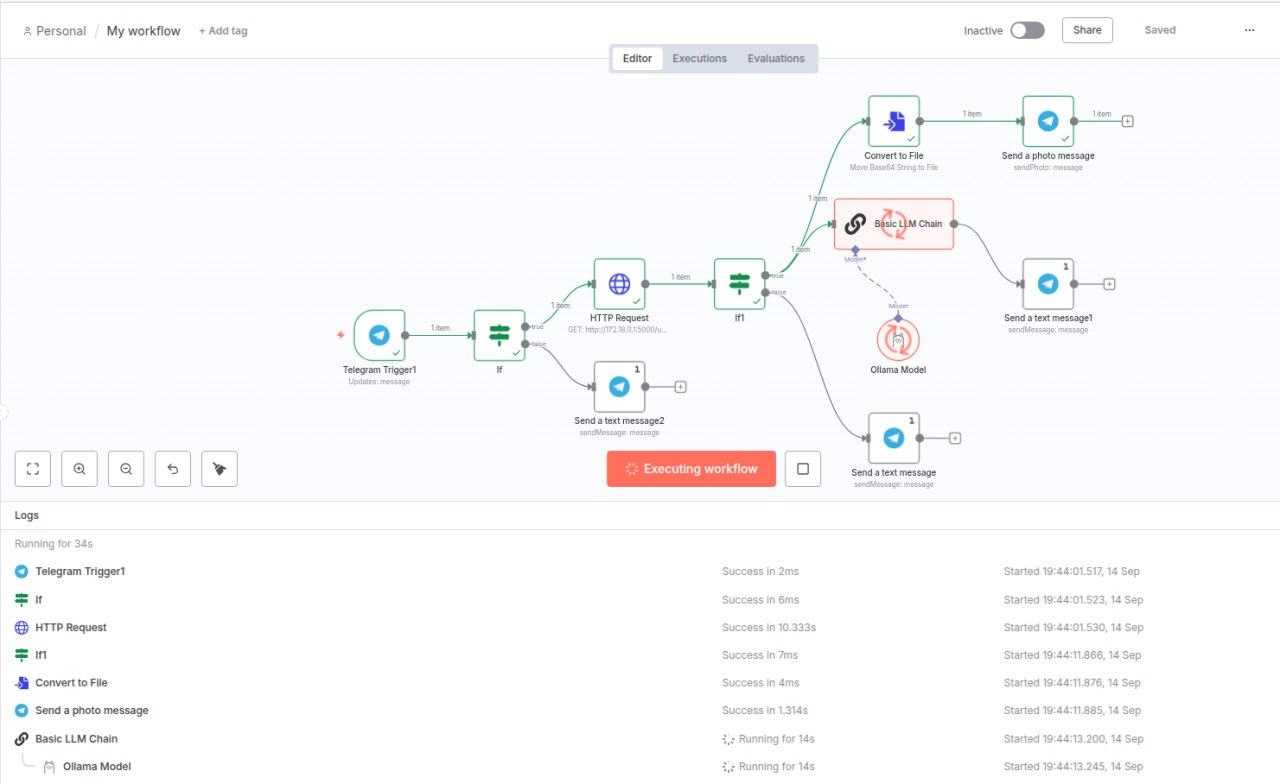 The N8N workflow in action: From Telegram trigger through HTTP requests and AI analysis to automated responses
The Complete Flow:
- Me: Text "Check Patio" to Telegram bot
- Telegram: Sends webhook to Ngrok URL
- Ngrok: Tunnels request to localhost N8N
- N8N: Triggers camera workflow
- Camera: Captures current frame
- AI: Analyzes scene with computer vision + LLM
- N8N: Sends analysis back via Telegram
- Me: Receives photo + intelligent commentary on my phone
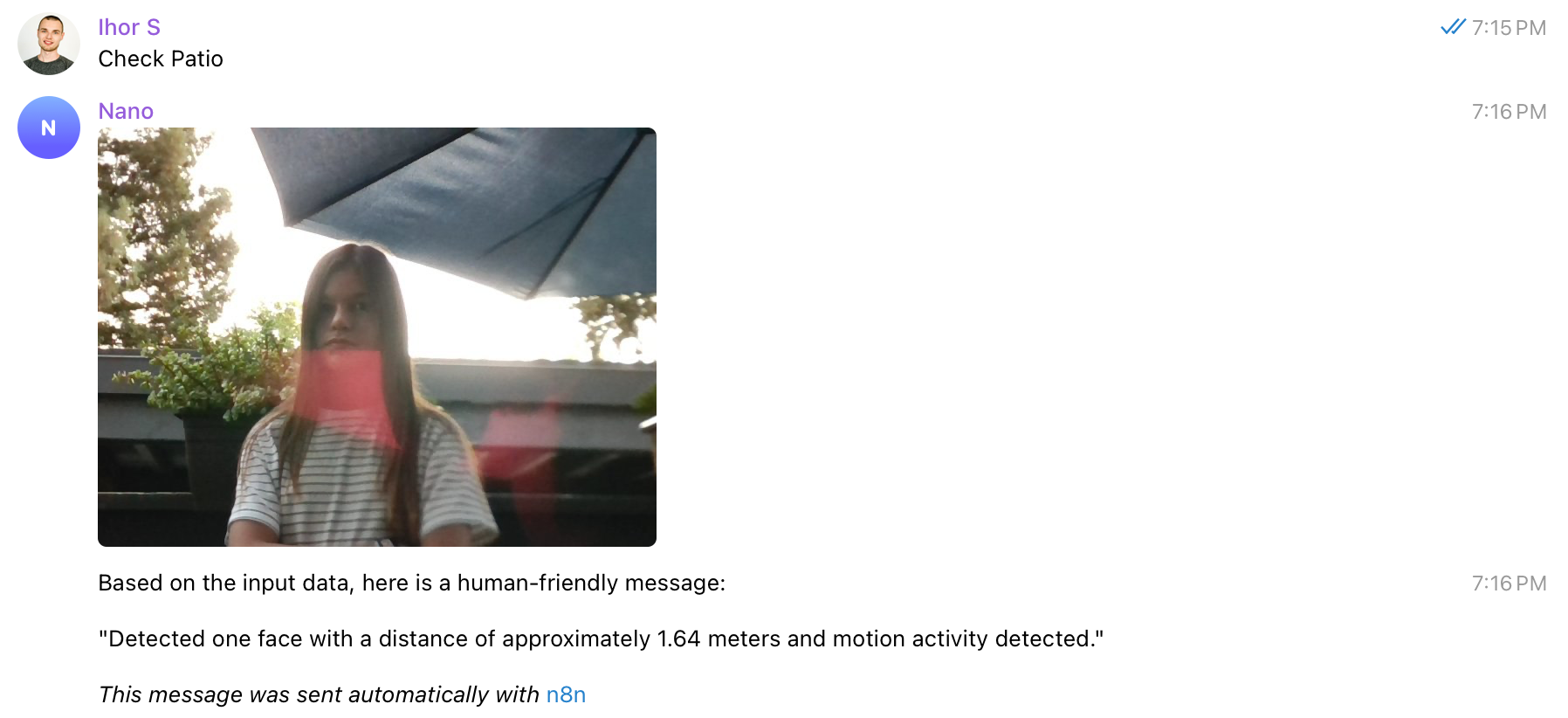 The magic in action: Sending commands to my AI agent via Telegram and receiving intelligent responses with visual analysis
Why This Was a Game-Changer
Ngrok transformed my local AI agent into a truly accessible system. Suddenly I could:
- Trigger workflows from anywhere with internet
- Use my phone as a remote control for my AI agent
- Have friends and family interact with the system
- Test webhooks without complex port forwarding
The combination of local AI processing power with internet accessibility gave me the best of both worlds: privacy, speed, and convenience.
ISSUE 4: Ubuntu + Bash + Python... I can't handle it anymore!
The Tech Stack Reality Check
Here's the honest truth: while the Jetson hardware is incredible, the development experience can be overwhelming if you're not deeply familiar with Linux systems. As a web developer whose daily tools are JavaScript, Node.js, and modern web frameworks, I found myself drowning in a sea of unfamiliar technologies:
- Ubuntu 22.04: Different from my usual development environment
- Bash scripting: Cryptic commands and permissions issues
- Python ecosystem: Virtual environments, pip conflicts, and dependency hell
- System administration: Service management, Docker configuration, hardware drivers
The Struggle Was Real
Initially, I relied on ChatGPT and YouTube tutorials to navigate this new territory. I'd spend entire weekends following guides, copying and pasting commands I barely understood, and somehow getting things to work. But then the next weekend would arrive, and I'd forget exactly what "magic" had worked the previous time.
The frustration was building:
- Commands that worked last week suddenly didn't work
- Different tutorials used different approaches for the same problem
- Error messages that made no sense to someone from a web development background
- Constantly switching between terminal windows, trying to remember file paths and configurations
The Breakthrough: Agentic AI to the Rescue
After several weeks of this struggle, I decided to try something different. Instead of fighting the system, I would let AI help me navigate it intelligently. I unleashed GitHub Copilot in agentic mode with Claude Sonnet 4, and everything changed!
The AI assistant became my Linux mentor:
- Context-aware help: It understood my project structure and could suggest relevant commands
- Learning companion: Explained not just what to do, but why
- Memory keeper: Tracked configurations and setups across sessions
- Problem solver: Debugged issues by analyzing error logs and system state
This was the turning point where development went from frustrating to fun. The AI didn't just give me fish - it taught me to fish in the Linux ecosystem.
ISSUE 5: RAM is a real limit.
The 8GB Reality Check
While the Jetson Orin Nano Super packs incredible AI performance into a tiny package, I quickly discovered that 8GB of RAM is the biggest limitation of this device. Unlike storage, which I could expand with an NVMe SSD, the RAM is soldered to the board and cannot be upgraded.
Here's the harsh reality: a 7B parameter LLM requires about 4.5-5GB of available RAM just to load the model into memory. That sounds manageable with 8GB total, but the operative word is "available" - not total.
The Memory Math That Doesn't Add Up
Let me break down how quickly that 8GB disappears:
# Fresh boot - checking memory usage
free -h
#               total        used        free      shared  buff/cache   available
# Mem:          7.6Gi       1.2Gi       5.8Gi       45Mi       658Mi       6.1Gi

# After starting essential services (Docker, N8N, system processes)
# Mem:          7.6Gi       2.1Gi       4.2Gi       78Mi       1.3Gi       5.1Gi

# Trying to load Llama2 7B model...
# BOOM! Out of memory errors
The RAM Juggling Act
To successfully run a 7B model, I had to become a memory management expert:
# Kill memory-hungry applications before loading models
sudo pkill chrome          # Chrome can easily use 1-2GB
sudo pkill code            # VS Code often consumes 500MB-1GB
sudo pkill firefox         # Any browser is a RAM hog

# Check what's consuming memory
sudo ps aux --sort=-%mem | head -10

# Free up buffer cache if needed
sudo sync && sudo sysctl vm.drop_caches=3
The Development Workflow Reality
This RAM limitation forced me to completely change my development workflow:
❌ What I wanted to do:
- Run VS Code for development
- Keep Chrome open for documentation
- Have the LLM running for testing
- Monitor N8N workflows in browser
- Stream camera feeds for debugging
✅ What I actually had to do:
- Write code in VS Code with Copilot, then stop it before testing
- Close all browsers before running LLM workflows
- Test LLM functionality in isolation after closing dev tools
- Restart services frequently to clear memory leaks
My Typical Development Cycle:
# 1. Code development phase
code .                      # Open VS Code with Copilot
# ... write code, use AI assistance, debug logic ...

# 2. Testing phase - stop everything first
sudo pkill code            # Close VS Code before testing
sudo pkill chrome          # Close any browsers
free -h                     # Check available memory

# 3. Run the AI workflow
ollama run llama2:7b        # Now there's enough RAM
# ... test the workflow ...

# 4. Back to development
code .                      # Reopen VS Code for next iteration
I still rely on VS Code and Copilot for actual development - they're too valuable to give up. But I've learned to work in cycles: code with full tools, then shut them down to test AI workflows.
The 13B Model Dream
I really wanted to run larger models like Llama2 13B or Mistral 7B with longer context, but they simply won't fit:
- 13B models: Need 8-10GB RAM minimum
- 7B with long context: Can easily exceed 6-7GB
- Multiple models: Forget about having options loaded simultaneously
Why This Matters for Your Projects
If you're considering the Jetson Orin Nano Super, be realistic about the RAM constraint:
✅ Works well for:
- Single 7B model inference
- Computer vision + small language models
- Edge AI applications with careful memory management
- Learning and experimentation (with workflow adjustments)
❌ Challenging for:
- Multiple LLMs loaded simultaneously
- Large context windows (>4K tokens)
- Development with full IDE + model running
- 13B+ parameter models
The Bottom Line
The 8GB RAM limit is real and non-negotiable. While you can work around it with careful memory management, it fundamentally shapes what's possible on this device. It's still an incredible platform for edge AI, but you need to design your applications with this constraint in mind from day one.
For serious development work, I often SSH into the Jetson from my laptop, keeping the heavy development tools on my main machine while using the Jetson purely for AI inference and testing.
Conclusion
After spending a month and a half playing with the Jetson Orin Nano Super, I'm absolutely glad I took this journey. What started as curiosity about local AI has turned into one of the most rewarding technical adventures I've had in years.
What I Gained
The experience has been invaluable in ways I didn't expect:
- New technical skills: I went from being intimidated by Linux to confidently managing Docker containers, configuring system services, and debugging hardware issues
- AI/ML understanding: Hands-on experience with local LLMs, computer vision, and edge AI gave me insights no tutorial could provide
- Tool mastery: N8N, Ollama, Ngrok, and the broader ecosystem of edge AI tools are now part of my toolkit
- Problem-solving mindset: Each challenge taught me to think creatively about constraints and find elegant solutions
- Pure fun: There's something magical about building an AI agent that can see, think, and communicate autonomously
The Learning Journey
Every frustration became a learning opportunity:
- Struggling with RAM limitations taught me efficient resource management
- Fighting with Linux forced me to understand systems at a deeper level
- Debugging camera integrations gave me hardware troubleshooting skills
- Building N8N workflows showed me the power of visual programming
- Wrestling with networking taught me about tunneling and webhooks
What's Next?
Honestly? I don't really know yet, and that's exciting. I'm still thinking about next projects, letting ideas percolate. The possibilities feel endless:
- Maybe a more sophisticated home automation system
- Perhaps computer vision applications for different domains
- Could be exploring robotics and actuators
- Might dive deeper into model fine-tuning and custom AI agents
What I do know is that this tiny green board has earned a permanent place in my toolset. It's proven that powerful AI doesn't require massive cloud infrastructure or expensive hardware. Sometimes the best learning happens when you're constrained to think creatively.
For Other Developers
If you're on the fence about getting a Jetson Orin Nano Super, my advice is simple: do it. Yes, you'll hit frustrating roadblocks. Yes, you'll spend weekends debugging obscure issues. But you'll also experience the thrill of building something genuinely intelligent that runs entirely under your control.
The future of AI is increasingly moving to the edge, and understanding how to build these systems now puts you ahead of the curve. Plus, there's something deeply satisfying about creating an AI agent that thinks locally, acts autonomously, and never sends your data to the cloud.
The journey from zero to agentic AI on a $249 device has been absolutely worth it. Now, what will you build?