

Design Is a Coding Job Now. Adapt, or Fade Out.
The world keeps accelerating. Technology evolves faster than most teams can adapt. Roles are shifting. Expectations are changing. And for designers, learning new ways of working isn't optional anymore.
The sooner we adapt, the better. That doesn't make it easy.
There's uncertainty in the air. Fewer traditional design roles may exist in the future. The way designers were trained will need to change. New tools are releasing daily, and the human brain struggles to keep up. Anthropic just shipped 73 product releases in 52 days — good luck catching up with every new feature.
What we're seeing right now feels like a peak. Everyone is racing to adopt — experimenting, automating, and keeping up all at once. But this phase won't last forever. Soon, companies will start asking a different question: How much does all of this actually cost to maintain? What does an FTE (or vendor rate) actually cost compared to tokens, subscriptions, and pay-as-you-go charges stacking up across a team? And when that happens, the focus will shift — from adoption to optimization.
"How can we operate more cost-effectively?" — the question that ends every hype cycle. According to the Technology Life Cycle, this is exactly where the peak of inflated expectations gives way to the trough of disillusionment. We're almost there.
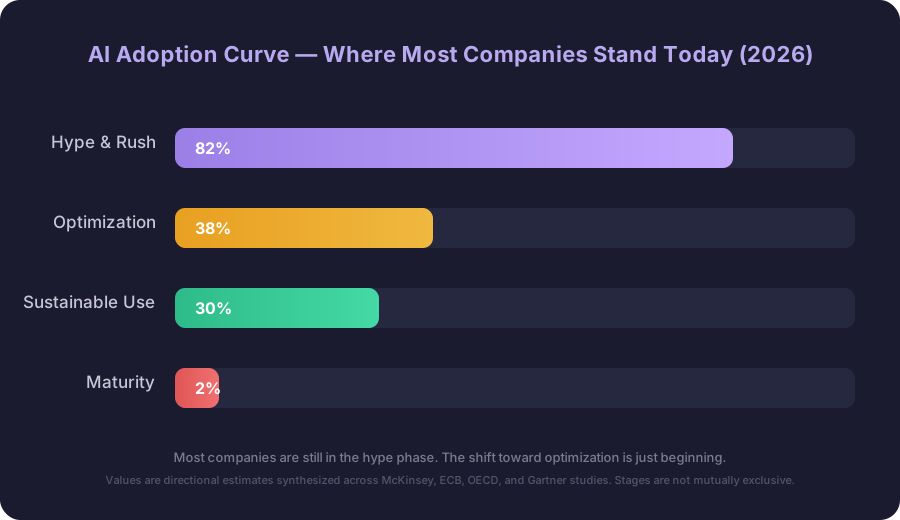
Based on McKinsey & Company — State of AI (2025), European Central Bank — AI adoption in firms (2026), OECD — AI reports, and Gartner — Hype Cycle. Values are directional estimates synthesized across studies; adoption stages are not mutually exclusive.
We've already seen early signs. Some companies pushed heavily into automation, reducing human involvement in customer support and operations. Reality proved more complex. AI alone couldn't fully meet user needs. It lacked context, nuance, the ability to handle edge cases. So humans came back into the loop — not as a fallback, but as a necessary part of the system.
When AI alone isn't enough
The pattern emerging across industries is consistent: AI handles volume well, but breaks down at the edges where human judgment matters most.
Case study · Klarna — The AI pendulum
In February 2024, Klarna laid off approximately 700 customer service agents, claiming its AI chatbot could handle their work. Impressive on volume. Not impressive on quality.

Customer satisfaction dropped. Repeat contacts jumped 25% as problems were deflected rather than resolved. The projected $60M in savings evaporated. By May 2025, the CEO reversed course publicly.
"As cost unfortunately seems to have been a too predominant evaluation factor when organizing this, what you end up having is lower quality."
— Sebastian Siemiatkowski, CEO of Klarna
Case study · IBM — AskHR and the empathy gap
IBM's experience with AskHR — deployed following the 2023 layoffs — revealed a familiar pattern: routine queries were handled well, but tasks requiring empathy, nuance, or subjective judgment consistently broke down. Performance reviews, conflict resolution, sensitive compensation conversations — all fell apart. Anything requiring a human read of the situation didn't survive the handoff. (IBM Research)
The industry pattern — Gartner, June 2025
Gartner predicted in June 2025 that 50% of organizations would abandon plans to reduce customer service headcount due to AI — a forecast grounded in early evidence of satisfaction gaps and quality failures.
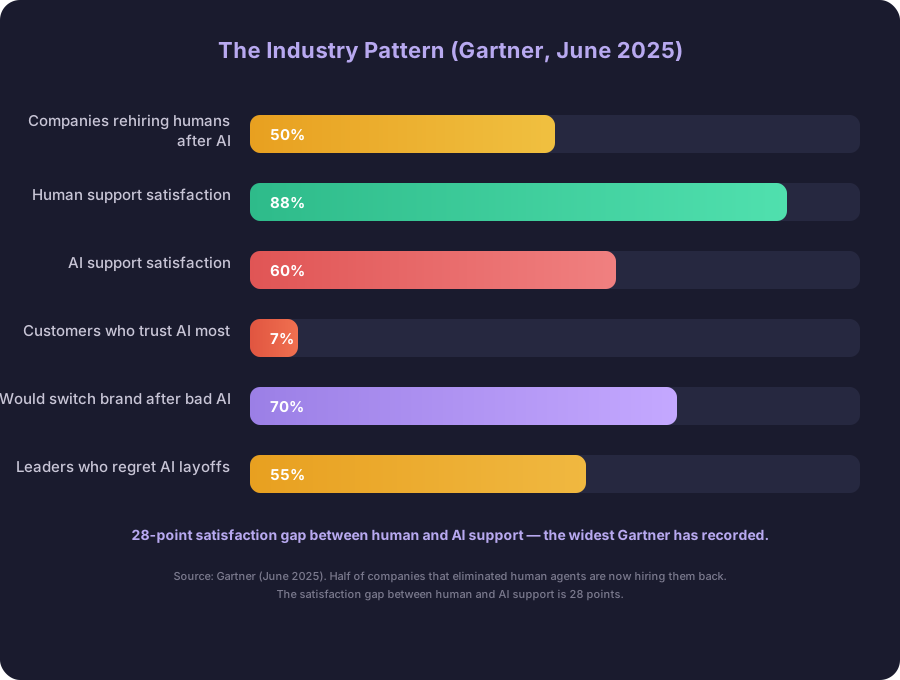
28-point satisfaction gap between human and AI support — the widest Gartner has recorded.
Companies seeing real success use AI to augment rather than replace — deploying AI for tier-1 support while keeping humans for complex issues. The goal isn't replacement. It's the right allocation.
The process isn't gone — it's breaking apart
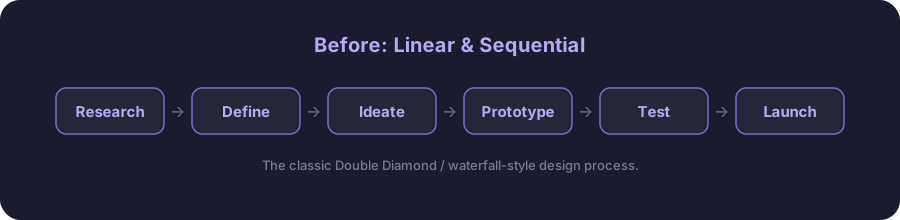
For years, design followed a familiar structure. Clean. Logical. Easy to teach. And increasingly — unrealistic.
Before: linear & sequential
Now: iterative & continuous
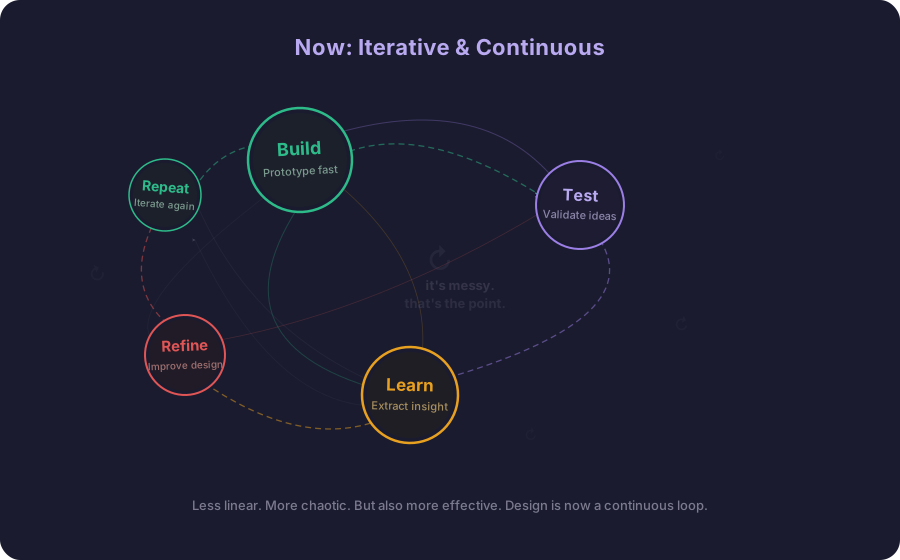
Less linear. More chaotic. But also more effective. What changed isn't the purpose of design — it's the speed. You still need to understand users. You still need to think critically. AI doesn't replace these fundamentals. It compresses them. What used to take weeks now happens in days. Design is no longer a sequence of phases — it's a state of constant movement.
The discipline shifts from execution to judgment: knowing what to build, what to test, and what the signal actually means.
What stays human, what gets amplified
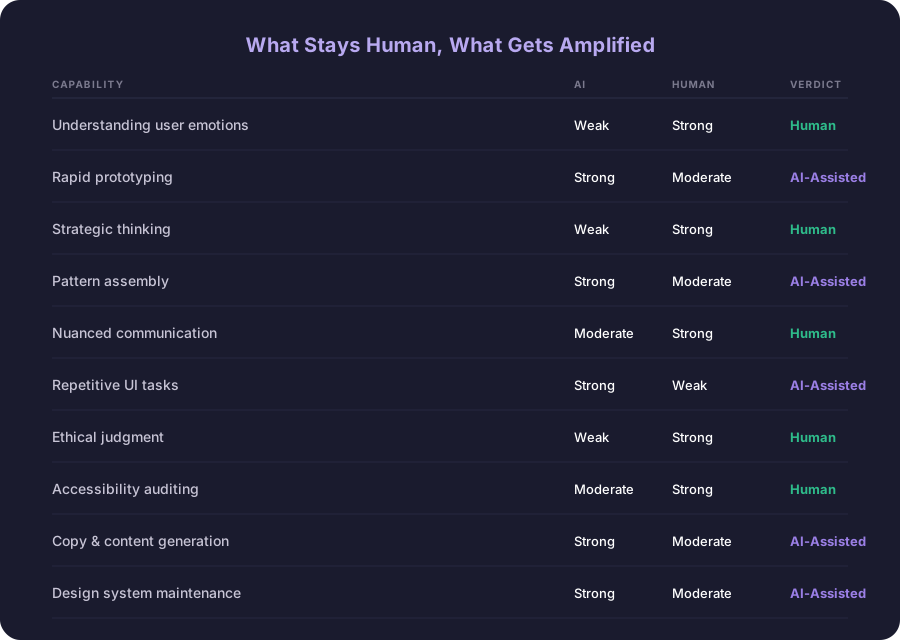
Your design system is AI's ceiling
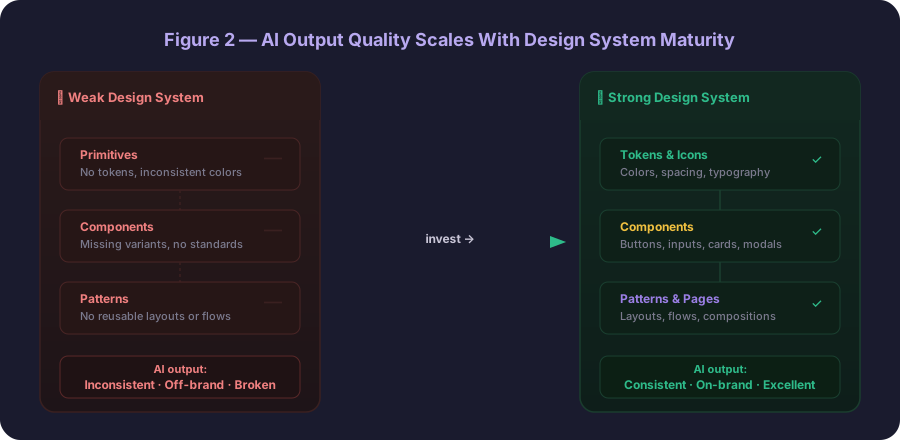
While everyone focuses on tools, something more important is happening underneath. AI is not a designer — it's a builder. It works with what exists: components, patterns, rules. It assembles rather than invents. Which means the quality of what it produces depends entirely on the system behind it.
This is where many teams hit a wall.
On my client projects, we connected AI to our design system through an MCP layer and the impact was immediate — simple tasks became faster, repetitive work decreased. But it also exposed something uncomfortable. Our system wasn't strong enough. Not enough components, not enough building blocks for AI to work effectively. AI doesn't flag this. It doesn't say "your component library is incomplete." It just produces inconsistent output, quietly, until someone sits down and figures out why.
Design systems are no longer just about consistency or efficiency. They're becoming the infrastructure that defines what's possible. Every gap in your system is a gap in what AI can build for you.
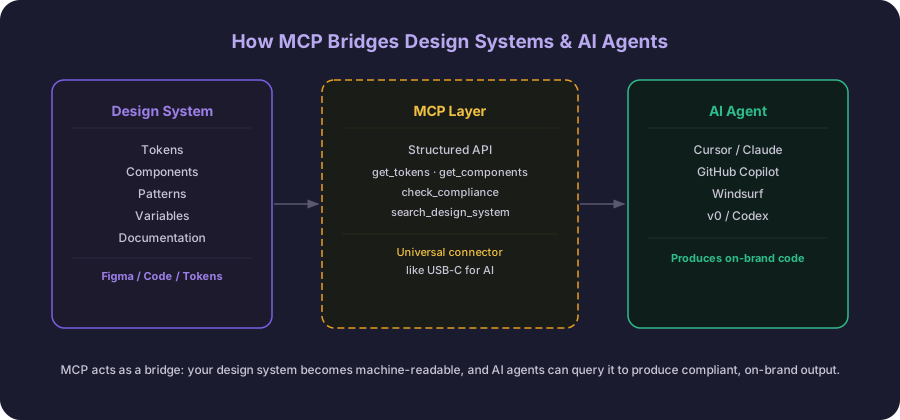
MCP: making design systems machine-readable
MCP (Model Context Protocol) is an open standard that lets AI agents read and interact with your design system in real time. Think of it as a universal connector — like USB-C for AI — that links models to live data sources, tools, and systems instead of relying on what's baked into their training. In a design context, that means AI can query your actual tokens, component names, and spacing scales directly rather than hallucinating plausible-looking values. When connected, AI stops guessing at tokens, spacing, and components — it queries them directly. The output is consistent and on-brand by default, not by accident.
| Without MCP | With MCP |
|---|---|
| Hardcoded hex colors | Uses design tokens |
| Inconsistent spacing | Correct spacing scale |
| Wrong component variants | Proper component usage |
| Accessibility gaps | WCAG compliance inherited from system |
| Requires manual QA pass | Ships faster, fewer reviews |
Tools worth knowing
- Claude (AI assistant & code editor) — The most direct way to bring AI into a design workflow today. Useful for writing copy variants, reviewing component logic, critiquing design decisions, and generating production-ready code from a brief. Works via browser, API, and MCP — and with Claude Code, it becomes a full agentic coding environment you run directly from the terminal.
- Cursor (AI code editor) — An IDE built around AI pair programming. Increasingly relevant for designers who want to prototype in code, inspect component implementations, or collaborate more closely with engineering. Understanding Cursor makes you a better partner to the developers building your designs.
- Figma MCP (Design → AI bridge) — Exposes Figma files as structured data AI agents can query directly — components, variables, tokens. No screenshots, no guessing. The missing link between design systems and AI-generated code.
- Atlassian MCP (Workflow) — Connects Jira and Confluence to AI agents. Designers can query project context, link design decisions to tickets, and let AI surface relevant specs or prior decisions automatically. Reduces the back-and-forth between design tools and project management.
- Git (Version control) — Not new, but newly essential. As design systems move into code and AI-generated output gets committed directly to repositories, designers who understand Git basics — branching, pull requests, resolving conflicts — will have significantly more influence over what actually ships. It's no longer just a developer skill.
What to actually do right now
Abstract advice about "adapting" is easy to give. Here's something more concrete — six things with real leverage in the current moment.
- Audit your design system. Identify which components don't exist yet. Every gap is a gap in what AI can build for you.
- Learn what MCP is and run one local experiment — even a small one. Understanding the plumbing gives you credibility and leverage.
- Take one recurring task you do manually and try letting AI handle it for a week. See what breaks, not just what works.
- Read one case study about how AI fails — not just how it succeeds. The failure modes are where the real judgment calls live.
- Have an explicit conversation with your team about who owns quality when AI is in the loop. Don't assume everyone agrees.
- Learn Git — it's now an everyday design tool. As design output moves into code, version control is no longer just a developer skill.
Every generation of designers has faced this
It's easy to think this moment is unprecedented. But we've seen similar transitions before. Technologies change. Tools evolve. Entire ecosystems shift.
We saw it when design moved from print to digital—when designers trained in typography and layout had to learn RGB color, screen constraints, and the logic of the web. We saw it again when table-based layouts gave way to CSS, forcing a shift from visual hacks to structured systems. When responsive design emerged, fixed canvases stopped working, replaced by fluid grids and breakpoints. When mobile took over, priorities flipped entirely—designing for constraints first, not last.
Even visual language itself reset. The move from skeuomorphism to flat design stripped away familiar cues and forced designers to rethink how interfaces communicate. At the same time, the role expanded—from producing static mockups to shaping flows, outcomes, and product decisions. From crafting individual screens to building design systems. From manual execution to collaborating with increasingly intelligent tools.
And every time, there's the same question: What happens to the people?
The answer is usually the same. They adapt.
But not everyone does. The designers who struggled in these shifts weren't the ones who lacked technical skill. They were the ones who held too tightly to a specific way of working—whether that meant clinging to print thinking, fixed layouts, pixel-perfect control, or purely manual craft.
Flexibility is the meta-skill.
The real bottleneck is alignment, not technology
If there's one thing that slows teams down today, it's not the tools — it's alignment. Adopting new ways of working affects everyone. This shift is not individual. It's organizational. And that makes it harder.
| Role | Challenge |
|---|---|
| Product managers | Need to rethink how they plan and prioritize. Overselling AI's ability is now a project risk, not just a communication problem. |
| A11y experts | Must ensure AI-generated interfaces meet accessibility standards — AI doesn't prioritize this by default and often ships non-compliant output. |
| Copywriters | Adapting to AI-supported content workflows. The skill becomes editorial — curating, guiding tone, quality-checking — not purely generative. |
| Developers | Building and maintaining the infrastructure — MCP layers, design tokens, APIs — that makes AI-augmented workflows reliable at scale. |
If you're an engineer reading this, design-as-code will quietly change how you work with designers.
You won't just get a Figma link — you'll see PRs. Token updates, bits of markup, maybe rough components that need review. Sometimes designers will own parts of the frontend. The work starts showing up where yours does.
Tokens become shared, not handed off. That means you'll review their changes, and they'll review yours. Code review becomes a two-way thing.
To avoid friction, define ownership early — who owns tokens, who approves system changes.
And when a designer opens a PR, treat it like any other. Same standards, same respect.
The line between design and engineering isn't gone, but it's moving. Better to adjust now than fix it later.
Speed that lasts vs. speed that breaks
One distinction matters more than most teams realize: designing with new tools vs. designing for a new reality. The first is about using tools to move faster. The second is about creating systems that make speed sustainable. Most teams focus on the first — they experiment, automate, optimize execution. But without investing in the underlying structure, those gains don't last.
Early adopters generated prototypes fast — impressive demos, quick wins. But a prototype that never touches a repo isn't a design artifact. It's a screenshot with a deadline.
The gap between "fast in Figma" and "shipped in production" is exactly where AI-accelerated speed collapses. Closing it means getting closer to where the source code actually lives — deeper into the SDLC than most designers have traditionally needed to go: understanding enough Git to branch and open a PR, knowing how your tokens map to code variables, being able to tell when AI-generated markup will break in a real component tree versus just looking right in a preview. Not becoming a full-stack engineer — but crossing the line from specifier to contributor.
None of this makes Figma obsolete. It remains the right tool for what it's always been right for — communicating intent, aligning stakeholders, exploring visual direction before a line of code is written. The point isn't to replace it. It's to stop treating the Figma handoff as the finish line.
That's the shift. From handing off a file and hoping for the best, to taking an idea from concept to committed code. Speed without roots impresses in demos. Speed with roots ships.
There's a separate distinction worth naming — designing with AI versus designing for AI — but that's a whole other article.
Where this leaves us
We're in a transition phase. Things feel messy. Fast. Sometimes unclear. But the fundamentals haven't changed. Good design is still about understanding people. Still about solving real problems. Still about making thoughtful decisions.
What's changing is how we get there. Design is no longer something you move through. It's something you stay inside. A continuous loop of thinking, building, and learning. The teams that embrace that shift won't just keep up — they'll define what comes next.